Introducing REST API Guard for WordPress with
REST API Guard controls who can reach your WordPress REST API, from blocking anonymous requests to allowing specific routes and requiring JWTs. Here's what the plugin does and how to use it with a trusted client.
WordPress's REST API gives applications a useful way to read published content and interact with a site. Depending on what you're building, you may want that API available to everyone, limited to a few routes, or accessible only to clients you've given a credential.
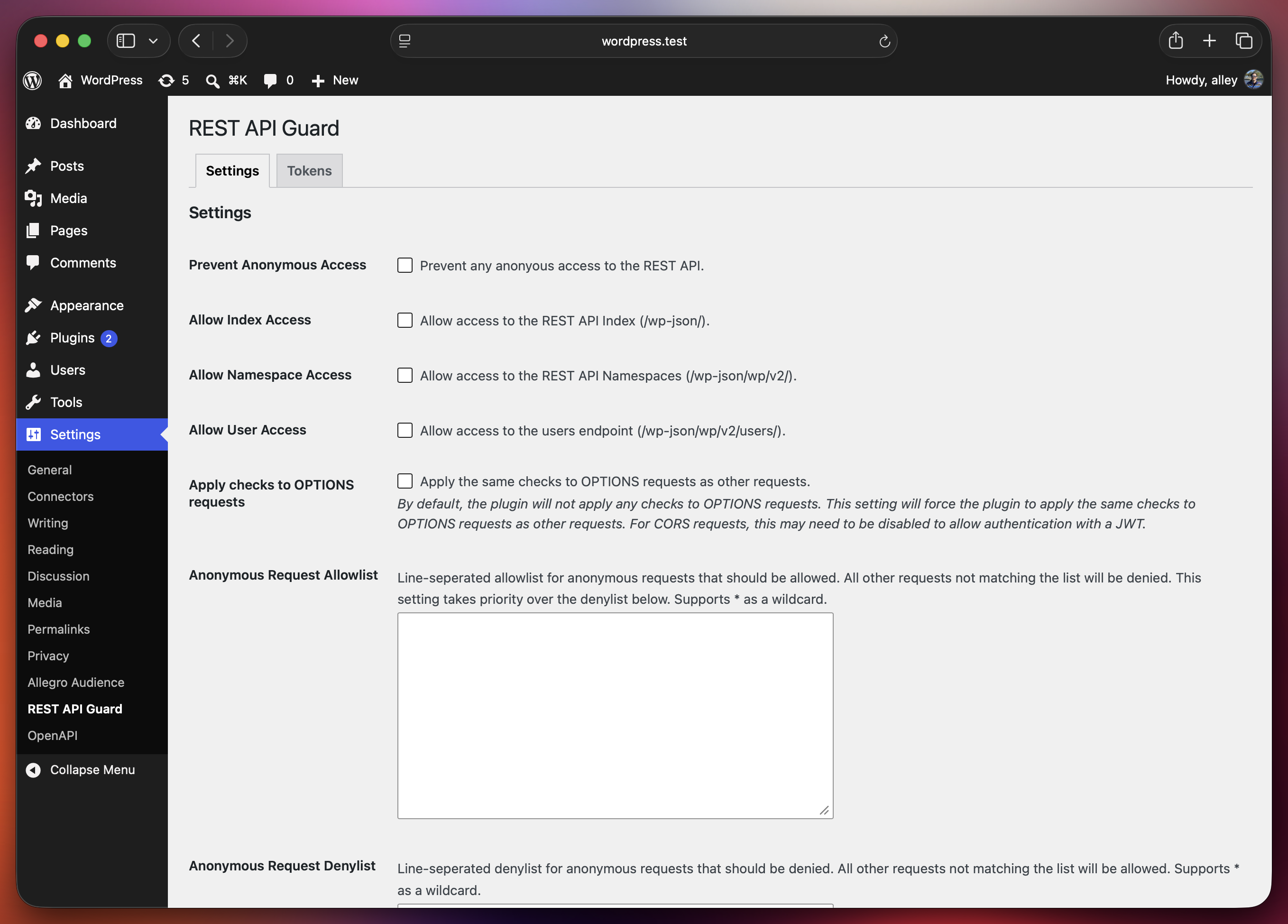
REST API Guard is a plugin I maintain for controlling that. It lets you restrict anonymous requests through a settings page or PHP filters, without adding the same access policy to every endpoint. It's available on WordPress.org and through Composer.
The plugin can be useful even if you never generate a token. Its basic job is to let you decide which parts of the REST API should be available anonymously. JWT authentication gives you another option when an application needs access but doesn't need a WordPress user.
What the plugin does
Out of the box, REST API Guard restricts anonymous access to the users endpoint, the API index, and namespace indexes. The index restrictions limit what a visitor can discover by browsing the API's directory of routes. They don't make those routes secret or automatically block requests to every route listed there.
Under Settings → REST API Guard, you can change those defaults and choose a broader access policy:
- Block anonymous access to the REST API entirely.
- Allow anonymous requests only to specific routes or namespaces.
- Deny anonymous requests to specific routes while leaving the rest available.
- Require a JWT from anonymous clients.
- Enable JWT authentication associated with a WordPress user.
An allowlist is useful when you know exactly what should be public, such as the routes a separate frontend needs to fetch posts. A denylist is useful when most of the API can remain public and you only need to restrict particular paths. If you configure an allowlist, it takes priority over the denylist.
Those controls apply to anonymous requests. A logged-in user's access still depends on WordPress's endpoint permissions and that user's capabilities.
Configuration can live in code
You don't need to use the settings page if your project keeps configuration in version control. The plugin exposes filters for its access controls. For example, you can block anonymous requests with:
1<?php
2
3declare(strict_types=1);
4
5namespace Example\REST;
6
7add_filter( 'rest_api_guard_prevent_anonymous_access', '__return_true' );
There are also filters for index access, namespace access, the users endpoint, allowlists, and denylists. The README covers those options.
I like having both approaches available. A small site can configure the plugin in the dashboard, while an application can make its access policy part of the code it deploys.
You can install it from the WordPress plugin directory or with:
1composer require alleyinteractive/wp-rest-api-guard
Give a client access without a WordPress account
Consider a separate application that fetches published posts from WordPress on its server. You want that application to reach the API, but you don't need it to log in as an editor.
REST API Guard supports anonymous JSON Web Tokens (JWTs) for that case. “Anonymous” means the request has no WordPress user attached to it. The token establishes that the caller holds a credential the site accepts.
Enable the anonymous JWT requirement in the settings page or with:
1add_filter( 'rest_api_guard_authentication_jwt', '__return_true' );
Generate a token, then send it in the request's Authorization header. Here's a direct cURL request using a bearer token:
1curl --header "Authorization: Bearer YOUR_JWT_TOKEN" \
2  https://example.com/wp-json/wp/v2/posts
Replace YOUR_JWT_TOKEN with the generated JWT and example.com with your site's domain. This makes a GET request for posts. The plugin validates the token's signature, issuer, and audience; by default, it expects the site's URL as the issuer and wordpress-rest-api as the audience.
A valid anonymous token still goes through the plugin's anonymous route restrictions. It doesn't override an allowlist, denylist, or the restrictions on users and indexes. Leave the option that blocks all anonymous access disabled for this setup, because a token without a user remains anonymous.
WordPress's endpoint permission callbacks still run, too. An anonymous JWT doesn't grant editor capabilities or make an endpoint read-only. A custom endpoint remains responsible for deciding which actions an anonymous caller may perform.
If the application needs to act as a particular WordPress user, the plugin supports user-associated JWTs as a separate option.
Tokens you can manage individually
The 1.5.0 release builds on the existing JWT support with token tracking and revocation.
When anonymous or user JWT authentication is enabled, a new Tokens tab lets you generate, name, list, and revoke tokens. Giving each application its own named token makes it easier to retire one integration's credential without changing the signing secret for every client.
You can do the same through WP-CLI:
1wp rest-api-guard generate-jwt --name="Frontend" --expiration=3600
2wp rest-api-guard list-jwts
3wp rest-api-guard revoke-jwt <id>
The generation example creates an anonymous token that expires in an hour. CLI expiration is measured in seconds from generation. Omitting --user keeps it anonymous; omitting --expiration creates a token without an expiration.
New tokens get an identifier and a stored record. Revoking a token makes subsequent requests fail validation even if its expiration hasn't arrived. Older tokens without an identifier remain accepted by default, but can't be revoked individually. After replacing those credentials, you can reject untracked tokens with:
1add_filter( 'rest_api_guard_allow_untracked_jwt', '__return_false' );
The release also sends no-cache headers on REST requests carrying an Authorization header. Check that your reverse proxy or CDN honors those headers and doesn't serve a cached response before the request reaches WordPress.
Where I'd use it
REST API Guard is a useful fit when you want an explicit policy around anonymous API access: a site that doesn't need a public API, an application exposing only selected routes, or a server-side integration using a credential to fetch content.
Keep a shared JWT on the client application's server. If you put it in publicly served JavaScript, visitors can copy it and make the same requests themselves.
The plugin gives you a central place to decide who can reach the API. Your endpoint permissions still decide what those requests can do. Keeping both parts explicit makes the configuration much easier to reason about.